

There were many announcements earlier this month about Power BI. One of them which was and still is the breaking news of all is Power BI Premium. Many of you already know that it is a new licensing plan, but how it works? Is this a licensing plan that works for you or not? What is the break-even point with this plan? In this post I’ll answer all of these questions with a detailed explanation about Power BI Premium. If you want to learn more about Power BI; read Power BI book; from Rookie to Rock Star.
Power BI Licensing Before Premium
To look at the new licensing plan, it is best to first understand how the previous licensing worked. Before this change, licensing plan for Microsoft were simple, it had only two plans: Free, and Power BI Pro. Free was free of charge obviously. All you needed was just your company email address to get Power BI account. Pro, however provided some additional features with a cost of about $9.99 per user per month.
Difference between these two plans was not about development work. You can do almost anything you want with Power BI free for doing the development work. But, when it comes to contribution, sharing, security, and using Power BI in production environment, most of features needed Pro account. Here are the details in a table;
| Feature | Power BI Free | Power BI Pro |
|---|---|---|
| Space allocation | 1GB | 10GB * |
| Power BI Desktop | Yes | Yes |
| Development features | Yes | Yes |
| DirectQuery or LiveQuery | No | Yes |
| Data Set Refresh Frequency | up to once a day | up to 8 times a day |
| Gateways – On-premises data source | No | Yes |
| Row Level Security | No | Yes |
| Content Pack | No | Yes |
| Work Spaces | No | Yes |
| Data Streaming | up to 10K rows per hours | unlimited |
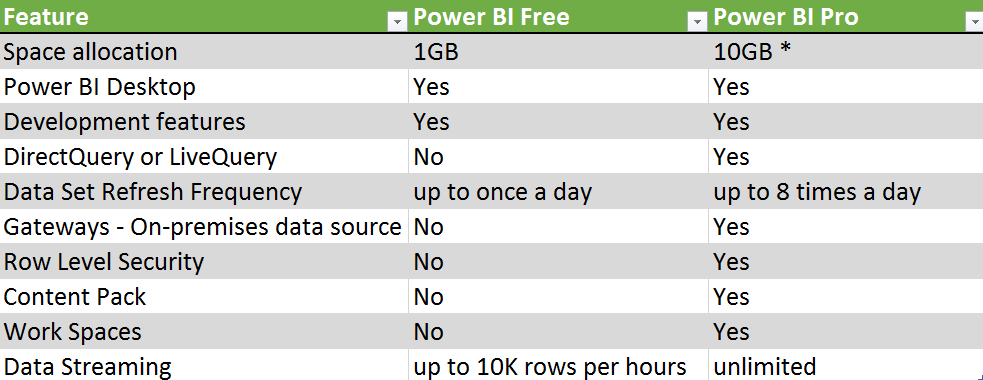
As you can see anything regarding to Developing a Power BI solution is available for free. However, for using Power BI in a production environment, most of the time you require Pro account. Here is more details;
- If you want to use a proper mechanism to share Power BI content with others, in most of the cases you need to use either Power BI work spaces, or Content Packs, which both are Pro features.
- If you want to use Row Level Security, which is giving access to users based on their part of the data set, not the whole, then you need Pro account.
- If you are using Gateways (doesn’t matter Personal or On-Premises) to connect to on-premises data source, then you need Pro account.
- For LiveQuery or DirectQuery connection to data sources you will need Pro account. LiveQuery or DirectQuery option happens a lot in enterprise environment when the size of data and scale is so high, that Power BI 1GB model cannot host it.
- and many more as you see in the table above
As you can see, in production environment of using Power BI, you will hit one of the limitations above for Free account, and you have to use Pro Account. This is very important to understand that;
Pro account is not only for developer, but also for consumer! If Power BI Content is Pro, then whoever uses and consumes that content should have Pro account.
Yes, you’ve read it correctly. Any content, that has one of below features considered as Pro content. and everyone who uses or consumes that content, should have Power BI pro account;
- Data from a DirectQuery dataset, such as SQL Server Analysis Services tabular data, Azure SQL Database, Azure SQL Data Warehouse, or Apache Spark for HDInsight.
- Data from a dataset that refreshes more frequently than daily.
- Data from a dataset that connects to on-premises data using the Power BI Gateway – Personal or the On-premises Data Gateway, and for which a scheduled refresh is set.
- Data from a live connection to Azure Analysis Services.
- Data (including reports, dashboards or tiles) from a dataset that uses Row-level security (RLS).
- A dashboard or report that’s installed from an app or an organizational content pack.
- A dashboard, report, or dataset that’s contained in an app workspace.
- A dashboard that contains data streamed at a rate above 10k rows/hour.
Source from: https://powerbi.microsoft.com/en-us/documentation/powerbi-power-bi-pro-content-what-is-it/
Why Premium?
With list of limitations for Power BI free and also pro account, it is almost obvious why we need another licensing plan (Premium). I just point few of them here for more elaboration;
Large User Base
Limitations in Pro Content as above means that if you are working in a large organization with 10,000 users, and you have to pay 10,000 * $10 per month, which would be $100K per month! or $1.2 million per year! This sounds scary!
Power BI Model Size Limitation
Also as you might already know; with Pro account you get 10GB space in your Power BI account. However, each Power BI Model (or let’s say file), cannot be more than 1GB! This means you have to combine then Power BI with other technologies such as SQL Server Analysis Services for LiveQuery connection, or a premier database provider such as SQL Server, Oracle, Teradata… for DirectQuery Connection. And that means paying for licenses for those products too. Because in enterprise environment it is very likely that size of Power BI model rise to more than 1GB.
Readers or Consumers
In most of the implementations of Power BI, majority of users are just readers or consumers of the report. Readers or consumers CAN interact with the report, they can use charts and visuals interactively and analyze the data, but they won’t create or update reports. There is always small amount of developers who do the development work. In this licensing plan, every user who is using Pro content, regardless of the role (developer, or consumer), should be pro account. This sounds like paying more than what you should pay!

What is Power BI Premium?
Now that you know about previous licensing plan of Power BI, I can start writing about Premium. What is the premium? Power BI Premium, is simply a licensing plan that covers limitations of Power BI pro account. It is a licensing plan that helps overcome what you couldn’t easily achieve with Power BI pro account. The license start at higher ground, at the time of writing this post it is $5K, but don’t be scared from this high cost, we will get into details of that shortly.

Is Power BI Pro and Free Gone Now?
No! Power BI Free and Pro are still there. However, there will be some changes in features supported by each type of account. I assure you here that all you can do with Power BI pro, you can still do it with Pro, so you don’t need to upgrade to Premium if you don’t want to.
Features that might be taken away from free are more about collaboration, such as sharing. So, in the feature for sharing Power BI content, you might need at least Pro account.
I Am Currently Using Power BI Pro, Is Premium The Only Option Now?
No! You can continue using Power BI Pro. Pro gives you all you have already, you won’t lose anything. and you don’t have to upgrade to Premium. However, using Premium gives you some more options and features, let’s look at them as below.
What Are Benefits of Power BI Premium?
Power BI Premium is an additional licensing plan. Additional means that you can use it or not, if you use this plan, then you would get some benefits that helps you to reduce costs of your BI solution sometimes. But, first you need to know what these features are. These features might be superb features for some companies, but not essentials for others.
Dedicated Power BI Resources
First and one of the most important features of Premium is that you get dedicated resources, such as capacity, cores and processing units. Normal Power BI Free or Pro accounts are publishing contents into SHARED Power BI servers. These servers are definitely high performing servers with great cores and capacity, however it is not dedicated.
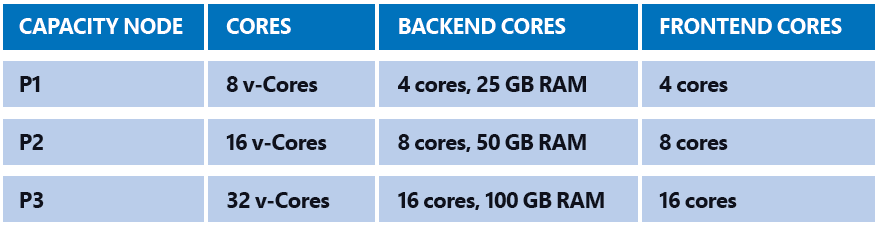
With Power BI Premium, you can choose type of node that you want, and configure your own Power BI node, here are nodes as for now;
Larger Data Sets Supported
As you already know from Pro limitation; even with Pro account you cannot have a model with more than 1GB of size, and your total space is about 10GB. With Power BI Premium you can have up to 100TB space to fill in! Your model can simply be sized 50GB, or more in near future. This means you might not need paying for additional SQL Server or another database technology for developing large scale BI solution.
More Frequent Data Set Refresh Rate
With Free you can refresh up to once a day. With Pro you can refresh up to 8 times a day. With Premium you can refresh your data set up to 48 times a day. The minimum frequency for refreshing data was 30 minutes, which is lifted in Premium. You can schedule on a minute level now with this new plan.
Readers or Consumers Plan
Power BI Premium is a licensing plan for readers and consumers. Readers can enjoy consuming a content that is still a Pro content, but with a licensing that costs less than Pro per user. So, if your company has 10K users, you don’t need to pay $100K per month, you would pay far less than that. I will get into the details of costs shortly.
Power BI Report Server
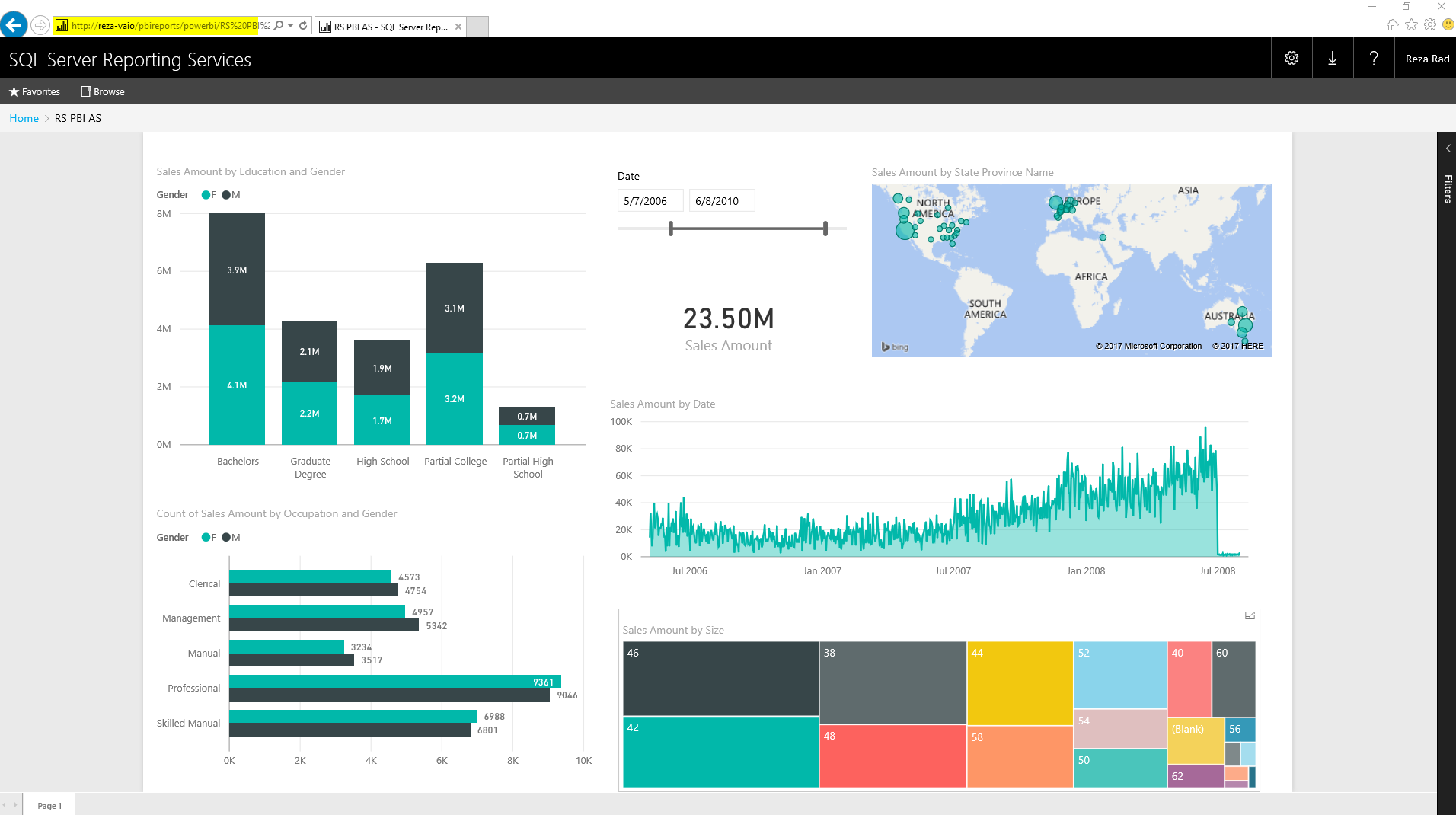
This part would need its own blog post of course, and is without a doubt one of the best offerings of Power BI Premium. Previously I have written about Power BI reports on Premises with Reporting Services. This functionality will be available as a new feature called Power BI Report Server. Power BI Report Server will be part of Premium licensing. So with purchasing Premium licensing you would be able to host your reports on-premises. More details about costs will come. But the good news is that you will have Power BI on-premises. To understand how that might work, read my blog post about hosting Power BI report on-premises.
Upcoming Features for Premium
Power BI Premium would be the best offering of Power BI, and there are lots of awesome features coming in for it in near future, such as below. Note that at the time of writing this post, features below are not available yet. These are in the road map.

Incremental Refresh
When we are talking about data set more than 1GB of the size, then incremental refresh matters. You don’t want to populate that amount of data in every refresh. With Premium you will have this option in near future to use incremental load and update only changed set.
Pin Data Set to Memory
Power BI by default allocate memory to models based on their usages. This automatic allocation sometimes might cause users to wait for their old report to load. In the feature you will have option to pin those data sets that you think are important and critical for business to memory and configure performance of Power BI based on your requirements.
Dedicated Data Refresh Node
You would be able to dedicate specific nodes for data refresh, while other nodes are providing response to report. This will help performance of report loading to be high while data set is refreshing.
Geo-Replica and Read-Only Replicas
You will be able to distribute replicas of Power BI model geographically and in other ways, so your users get the best performance.
The Most Important Topic! Costs of Premium
Cost of Power BI Premium is the most important topic to discuss. When Premium announce first time, I have seen lots of people scared from the $5K entry point of it. Let’s get into details of costing and see how it is working.

There is a calculator that helps you understand the costing based on your requirement. Basically the costing is based on how many developers (Pro) accounts you have, how many frequent users, and how many readers. The reason to separate frequent users and readers are mainly to understand how many cores you will need for Power BI Premium.
Let’s go through an example. Consider an organization with 10K users. out of these 10K uses, only 300 of them are developers (they will create or update reports), rest are just consuming reports (Let’s say 4.8K frequent consumers, and 4.8K occasional). Based on the calculator for such requirement, you will need to have 300 Pro users (this is obvious), and 6 P1 nodes to cover readers. Each P1 Node costs $5K per month.
So as a result it would costs about $32K;

The costs is high of course, but if you compare it with purchasing 10K Power BI Pro plans ($100K) it is almost one third of that cost! As I mentioned before, you don’t need pay price of Pro for readers, so that makes your costs lower.
Also you will notice in the calculator that this costing is including Power BI Report Server. so with this cost you are also able to host reports on-premises.
But Would This Premium Cost Be Always Better?
No! Like many other things, it depends. If you are working for a large enterprise with thousands of users, and most of users are consumers, then as you saw in the example above it would be much more cost effective to purchase Power BI Premium licensing.
However, if you are medium size or small business with few hundreds of users or even less, then maybe Power BI Pro is better option for you. Here is an example;
If you have 50 users for Power BI, even if you purchase Pro account for them all, you have to pay $500 per months. However for premium you would need to pay at least $5K which is ten times more expensive. So with the current entry point of nodes (which is $5K), it is not cost effective to pay for Premium if you have such a small user base. simply continue using Power BI Pro.
If you need to host Power BI on-prem, you might still need to consider Premium even with small user base, because Power BI Report Server is available within Premium, or with SQL Server licensing (more details to come in the future).
What is Break-Even Point?
One of the most common questions in this area is that when I need to use Premium, and when pro? what is the break-even point?

The answer to this question can be calculated easily. I cannot give you a precise number, because there are many different situations to consider details: Example: Two companies that have 5K users, and one of them might have 2K developers, the other one 200 only. One of them might have all users as frequent users, the other one 80% occasional users. Depends on your requirements number of nodes for Power BI Premium is different. and number of nodes has a direct affect on the costs.
I advise you to use the calculator and enter your total number of users, frequent users, and occasional users, then check if the total price with that requirement is lower than purchasing Pro account for all users, then you’re break-even point is passed. If not, then you can simply use Power BI Pro.
I’ve had two examples in my post already. here are summary of those again;
- A large enterprise with 10K users, which only 300 of these users are developers, and the rest are half frequent, and half occasional users. 6 p1 nodes of Power BI would cover this user base, and so the cost would be: 300*$10 (per user Pro account) + 6*$4,995 (per node Premium) = $32,967. This cost is far less than 10K*$10 (per user Pro account) = $100,000. So this organization should use Premium obviously.
- A small/medium size business with 50 users, even if pay $10 for pro account for everyone, it is paying $500 per month. However, if this company purchases premium. The minimum entry point (At the time of writing this blog) is $4,995 which is ten times more expensive. So this company can simply continue using Power BI Pro.
Summary
In Summary Power BI Premium is a great offering. It comes with lower pricing for enterprise scale customers, and with many features such as dedicated server, higher data set size, higher frequency of data refresh, Power BI on-premises and many other options. However, not all companies need these features, neither they have large user base. they can simply use Power BI Pro license as they are using already and enjoy the current offering. If you like to read more about details of Power BI Premium, I recommend reading Power BI Premium Whitepaper written by Amir Netz.
Your Thoughts?

With Power BI Premium offering there were a lot of noises, questions, rumors, and comments about the offering. Some people said it is perfect, some said this is too expensive (the entry pricing), some said some of features should be available for Pro, and many other suggestions. Please note that this licensing plan is available to help in areas that other two plans couldn’t (you already know it if you read my post fully). However, I would like to use this post as a message to Microsoft and let then know about what do YOU THINK about this change? What is good or bad about it? Do you have any suggestions that can make this offering better? Please let us know in comments area, I’m sure Microsoft Power BI team will consider every comments here (I’ll pass these to them). Thanks in advance for your collaboration.


Reza is author of more than 14 books on Microsoft Business Intelligence, most of these books are published under Power BI category. Among these are books such as Power BI DAX Simplified, Pro Power BI Architecture, Power BI from Rookie to Rock Star, Power Query books series, Row-Level Security in Power BI and etc.
He is an International Speaker in Microsoft Ignite, Microsoft Business Applications Summit, Data Insight Summit, PASS Summit, SQL Saturday and SQL user groups. And He is a Microsoft Certified Trainer.
Reza’s passion is to help you find the best data solution, he is Data enthusiast.
His articles on different aspects of technologies, especially on MS BI, can be found on his blog: https://radacad.com/blog.
There are EM nodes available now that can be used for embedded deployments only. So, then Premium offering makes it reasonable for small-medium organizations to embed reports. Unfortunately, with this option you can have on-prem reporting server
https://aka.ms/pbiewhitepaper
Hi Boris, Yes EM licensing are better pricing options for medium size businesses.
I will write a separate post explaining that.
Cheers
Reza
@boris
thanks very much.
the power BI calculator does not have the M1, M2 and M3 , only P1…
Now my company can to buy PW BI Premium M1 for US$ 625
https://aka.ms/pbiewhitepaper
Hi, Could you explain about power bi premium cost at first tier now, the message states that power bi premium is available at 625/m . is it true?
the rate of 625/m is for Power BI embedded. It is a dedicated capacity and can be used for embedded scenarios. It is what called as A1 node type. A1 to A3 is useful for embedded scenarios, where the P1 to P3 which starts at 5000/m good for premium.
Thanks Reza,
Information is clear with BI premium to go or not. I have been using the software with Premium capacity, however org has not enabled data flow resulting in uploading clean data. Preparing data set in BI without Query folding has significantly affected the usage/promotion of BI as visual tool. Admins failing to understand, how BI works has resulted in constant data not refreshing with gate way crashing. By keeping the price high, users like us to test other premium features are unable to use the program to the full. is there any way Microsoft reduces price for a single user to test the premium for a month or so.
Hi Krishna
I feel your pain. You need to talk to your local Microsoft Salesperson about this I believe, They might give you some options. I am aware of nothing in terms of test plans or trial premium, unfortunately.
Cheers
Reza