
Microsoft Fabric is an end-to-end data analytics Saas solution product of Microsoft. It brings many workloads in the analytics area, including Data Integration, Warehousing, Engineering, Business Intelligence, Data Science, and Real-time Analytics. It is often a question of how the pricing of this platform works. This looks expensive, and how much I should pay for that are common questions. So here in this article and video, we will deep dive into the licensing in a way that answers all your questions.
Video
What is Microsoft Fabric
Microsoft Fabric is an end-to-end Data Analytics platform software-as-a-service from Microsoft. This platform uses multiple workloads to carry all services related to data analytics, such as data integration, storage, data warehousing, data engineering, Business intelligence, Data science, etc.
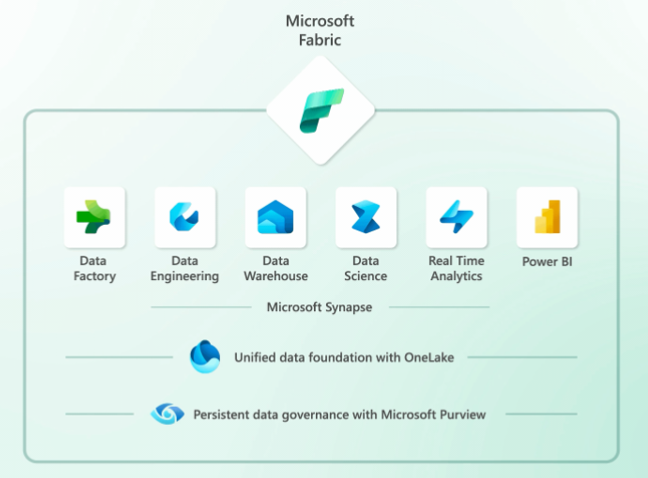
These are good starting points if you want to get yourself more familiar with Microsoft Fabric;
Fabric Capacity Struture
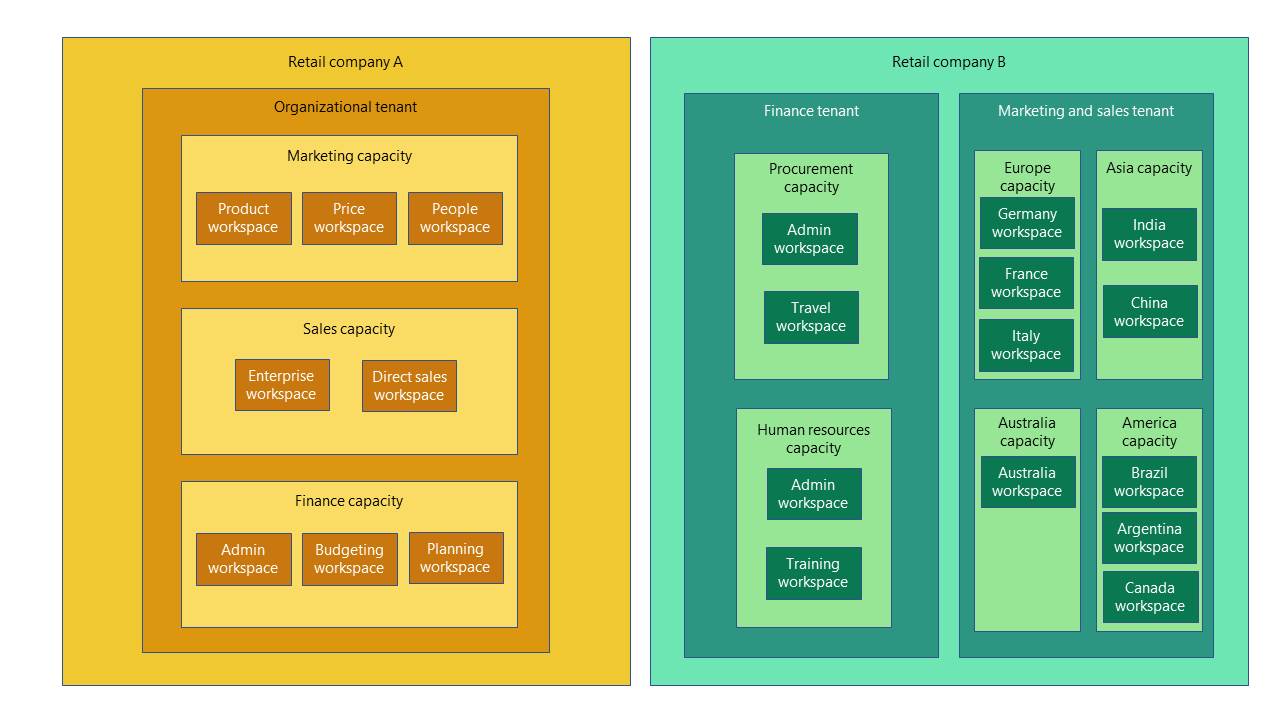
To understand the licensing for Microsoft Fabric, You first need to understand the Capacity structure. In Fabric, there are three important sections that the content can be organized into those; Tenant, Capacity, and Workspace.
Tenant is the most fundamental part of the structure of Fabric. Each domain can have one or multiple tenants.
The capacity is the substructure under the tenant. You can have one or multiple capacities in each tenant. Each capacity is a pool of resources that can be used for Microsoft Fabric services. There are different SKUs for different levels of resources. I’ll explain the pricing and SKUs shortly after.
Inside capacities, you will have workspaces. Workspaces are sharing units that will be used for developers and users. For example, you will create Lakehouse, Data Pipeline, and Dataflow inside a workspace, and you can share them with the rest of the developer team. A workspace is assigned to a capacity. However, you can have more than one capacity associated with one workspace. The screenshot below shows how Tenant, Capaicy, and Workspace work together.
What is a Capacity?
A Capacity is a pool of resources (which can be measured by CU: Capacity Unit) for dedicated use. These resources can be included but not limited to CPU, Memory, etc., on the Microsoft Azure environment, which gives you the computing power to process the Fabric services.
SKUs and Pricing
There are different levels of these resources categorized into different SKUs.
| SKU | Capacity Units (CU) | Power BI SKU | Power BI v-cores | Hourly $ | Monthly $ |
|---|---|---|---|---|---|
| F2 | 2 | – | 0.25 | $0.36 | $262.80 |
| F4 | 4 | – | 0.5 | $0.72 | $525.60 |
| F8 | 8 | EM/A1 | 1 | $1.44 | $1,051.20 |
| F16 | 16 | EM2/A2 | 2 | $2.88 | $2,102.40 |
| F32 | 32 | EM3/A3 | 4 | $5.76 | $4,204.80 |
| F64 | 64 | P1/A4 | 8 | $11.52 | $8,409.60 |
| F128 | 128 | P2/A5 | 16 | $23.04 | $16,819.20 |
| F256 | 256 | P3/A6 | 32 | $46.08 | $33,638.40 |
| F512 | 512 | P4/A7 | 64 | $92.16 | $67,276.80 |
| F1024 | 1024 | P5/A8 | 128 | $184.32 | $134,553.60 |
| F2048 | 2048 | – | 256 | $368.64 | $269,107.20 |
The CU can be used to understand the computing power of each SKU. For example, F4 has twice the power of F2 and is half of the power of F8.
The prices in the tables above are USD, and the F SKUs do not have any yearly contracts. You can turn them off or on any time you want. In a few months, some yearly licenses (RI) will be announced, which will have lower pricing because of their minimum yearly terms.
Any SKUs lower than F64 would require Power BI individual licenses (Pro or PPU) for Power BI sharing.
Storage
Microsoft Fabric storage is OneLake. OneLake’s storage costs are not included in the capacity licensing. You will need to pay for that separately. The OneLake cost is similar to ADLS (Azure Data Lake Storage) pricing. For example, US West 2 storage costs $0.023 per GB monthly.
If there is a need to transfer data between regions, there might be charges associated with that too, which you can read here.
User-based licensing
Initially, user-based licensing was used in Microsoft Power BI and is still in use. In Power BI, the capacity can be shared capacity or Dedicated (Premium or Embedded). And users also need to have accounts. The User accounts are Free, Pro, and PPU (Premium Per User). I have explained the Power BI Licensing in detail here.
Regarding Fabric objects and services, Capacity is the deterministic factor of what you can and can’t do. If you have a shared capacity, then you cannot use Microsoft Fabric. You can only use Power BI objects. If you have a dedicated capacity (Fs), you can use the Fabric objects, but users will need user-based accounts. These accounts, however, can be free. You would need Pro, or PPU accounts only if you are using low F SKUs that are not supporting Power BI objects (Lower than F64).
What Does it Mean In the Real World?
The definition of licensing seems simple, but what does it really mean in the real world? How are these related to Power BI licenses etc.? Let’s talk about that in this section.
Easy to Experience F2
The best way to experience it is to work with it with your data, Provision an F2 capacity, create Lakehouse or Warehouses, feed data into that using Data Pipelines and Dataflows, and then create other objects. If the whole experience even takes three hours, it would be about $1 cost to you, which in that you can find out how performant it is. I’m sure you will be amazed by the performance you will get even with F2.
Getting Started
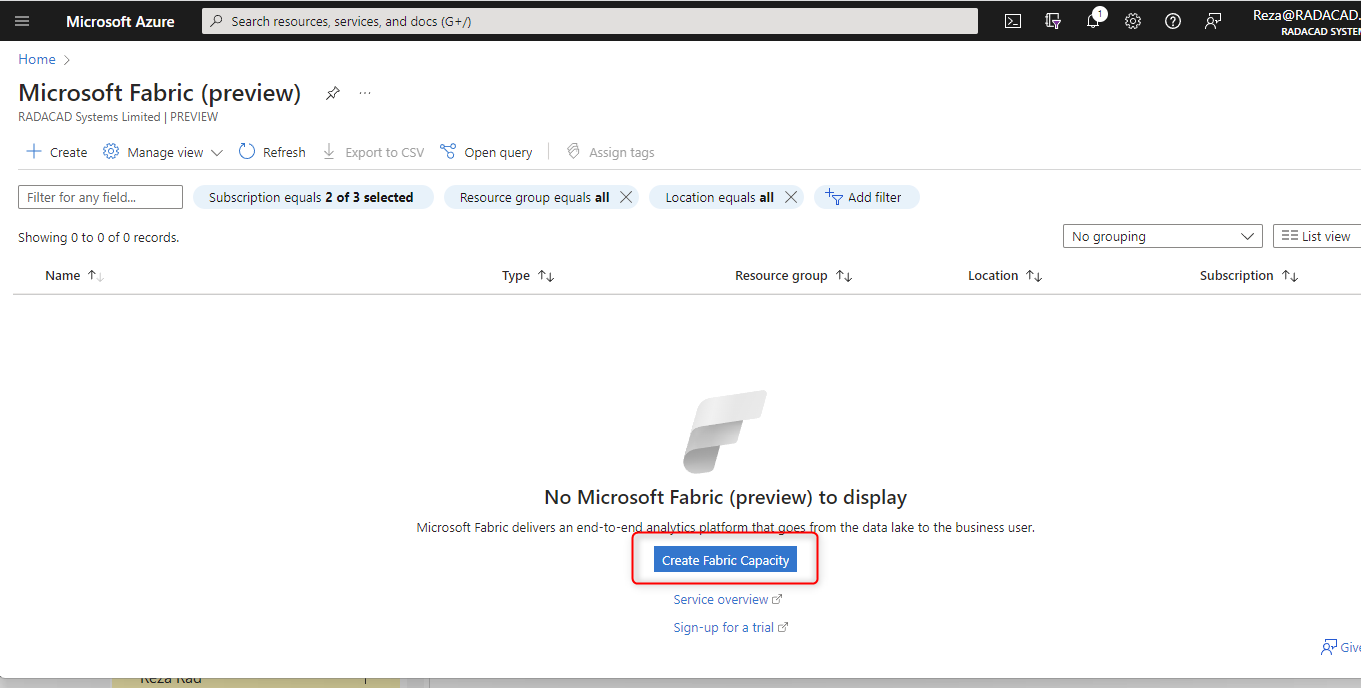
To start using Fabric, Go to Microsoft Azure Portal; https://portal.azure.com.
Search for Microsoft Fabric resource
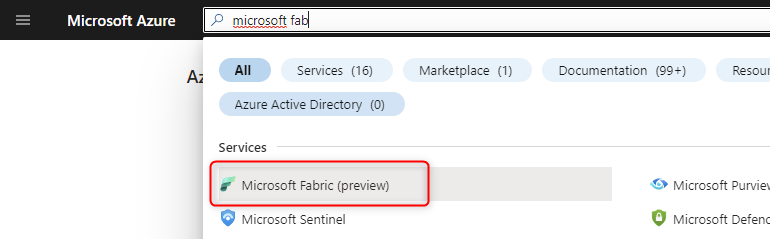
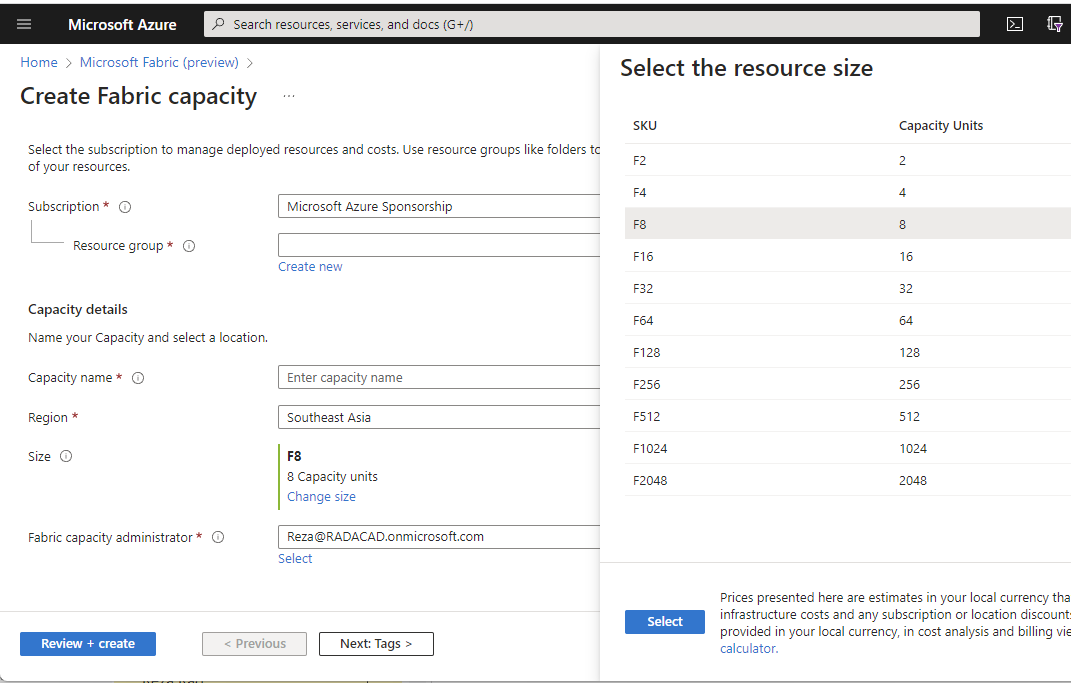
Create a Fabric capacity;
Then choose the SKU you want as the Size
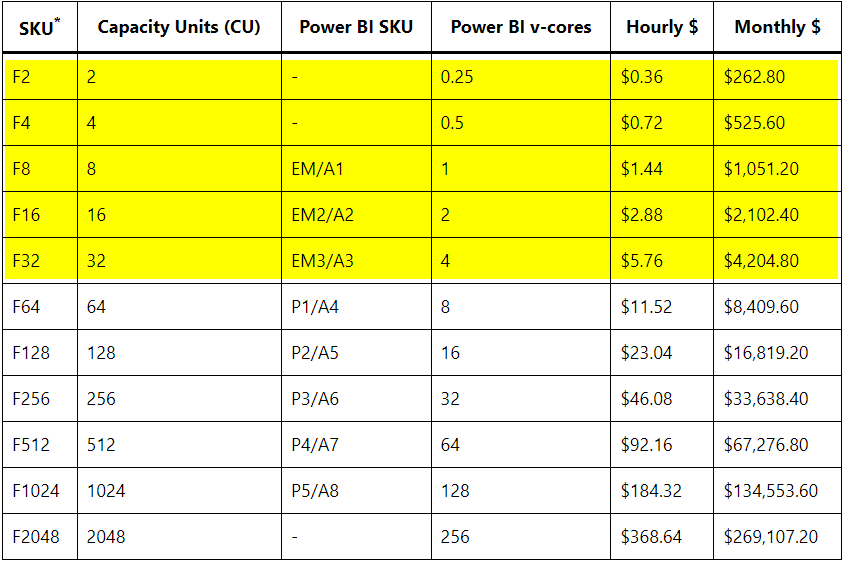
F2 is not for Power BI sharing.
A misconception from the licensing is that you can use F2 with free users for sharing Power BI content through the organization. You cannot.
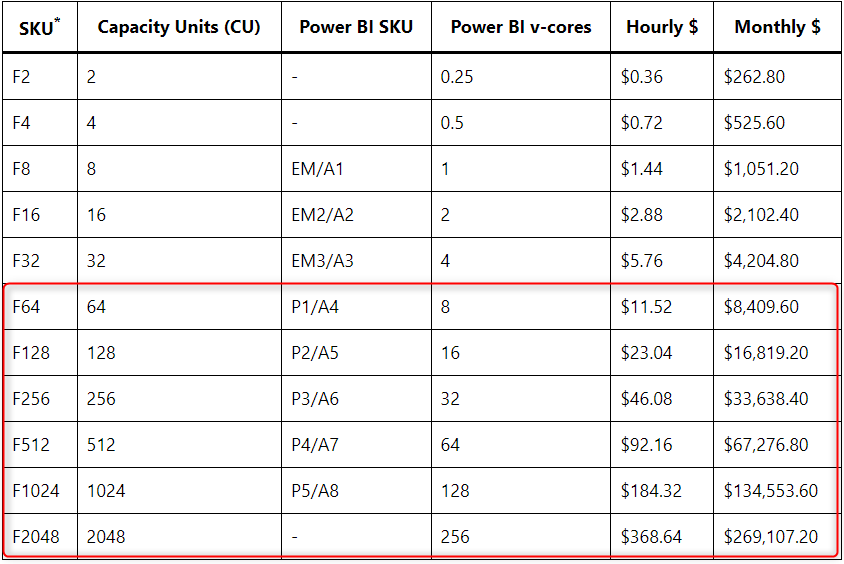
To share the Power BI content freely across the organization, you must be on a minimum F64 (Equivalent of P1) or higher SKUs.
This means that if you use F2 and you want Power BI content sharing, then you would also need Power BI Pro individual accounts.
No Change in Power BI licensing
The key thing to understand here is that nothing has changed in the Power BI licensing with the appearance of Fabric. You still have the Free, Pro, and PPU user-based licenses plus the EM, A, and P SKUs for dedicated capacity licenses, and they all work as they did before. If you are not going to use any of the Fabric services (except Power BI), then everything will be as it is already for you, with no change.
I have explained Power BI licensing in detail here;
Low F’s plus Power BI Pro: Perfect for Small Businesses
One of the very good combinations to get both Microsoft Fabric and Power BI content sharing at a low price is combining a low F SKU (for example, F2) with a minimum Power BI account that allows sharing (which is Power BI Pro).
For example, An organization with 50 users wants to use premium features in Power BI (such as computed entities in dataflow, etc.). For this organization, the best option is to get 50 PPU accounts, costing 50x$20=$1K per month. However, if this organization gets an F2 plus 50 Pro users, the total cost will be $263+$500=$763 per month. You may pay slightly more for the storage, but that is minor. The overall cost is cheaper, and this organization can now use other Microsoft Fabric services.
Power BI Premium with Benefits
F64 is equivalent to P1, F128 is equivalent to P2, etc. Microsoft is enabling Power BI Premium capacities to automatically be Fabric capacities. This means that not only you can create Power BI content and share it, but then you can also use Microsoft Fabric services and objects at no extra costs. That is why I call it Power BI Premium with benefits. Now you can have P1 but can create Lakehouse, Data Warehouse, Data Pipelines, etc., at no extra costs.
F’s can be Paused and Restarted
A big benefit of F SKUs is that there is no minimum-term contract. You pay as you go. If you want to pause the service or restart it, you can.
RI’s will be even cheaper.
The F SKUs are a bit more expensive because the contract has no minimum term. In a few months, Microsoft will announce some yearly RI SKUs, which would be cheaper than their F equivalent.
Summary
In Summary, Microsoft Fabric licensing is simple to understand. However, if combined with Power BI, it might look confusing. In this article, I shared some sample scenarios that can help you understand how it works and what is the best licensing structure for your case.
To learn more about Fabric, I suggest reading the below articles;
- What is Microsoft Fabric
- How to enable Fabric in your organization
- What is Lakehouse, and a sample Dataflow Gen2 created to load data into it.
- Getting started with Data Pipelines in Microsoft Fabric Data Factory
- Getting started with Dataflows in Microsoft Fabric Data Factory
- What is Data Factory in Microsoft Fabric
- Microsoft Fabric Data Warehouse


Reza is author of more than 14 books on Microsoft Business Intelligence, most of these books are published under Power BI category. Among these are books such as Power BI DAX Simplified, Pro Power BI Architecture, Power BI from Rookie to Rock Star, Power Query books series, Row-Level Security in Power BI and etc.
He is an International Speaker in Microsoft Ignite, Microsoft Business Applications Summit, Data Insight Summit, PASS Summit, SQL Saturday and SQL user groups. And He is a Microsoft Certified Trainer.
Reza’s passion is to help you find the best data solution, he is Data enthusiast.
His articles on different aspects of technologies, especially on MS BI, can be found on his blog: https://radacad.com/blog.
So, I could buy an F2 and my Power BI Pro users could access the datasets and shared reports in that F2 Fabric Capacity?
Yes, that is correct 🙂
Great explanation, but why F64 license is so expensive compared to P1 license? I see no difference them both.
F64 is a license without term, meaning you can stop and start it anytime. P1 has terms of yearly/monthly. That is why the difference in pricing. When RI licenses comes out I expect they be much closer to P licensing costs
Cheers
Reza
Whats your take on having fabric items such as lakehouse, datawarehouse etc in a separate fabric workspace and then build pbi datasets upon those which then could reside in a PPU workspace? saving storage and consumption from a lets say f8 fabric capacity?
It is possible. however, you then have to pay for both F capacity and PPU, It might be better to do F capacity and Pro if you manage them all in one Workspace. The size itself won’t be the problem, and I imagine the Lakehouse or Warehouse gets the data loaded at a different time of the day, and then it loads the data into Power BI dataset (if not Direct Lake), so one capacity should be able to cover it all.