
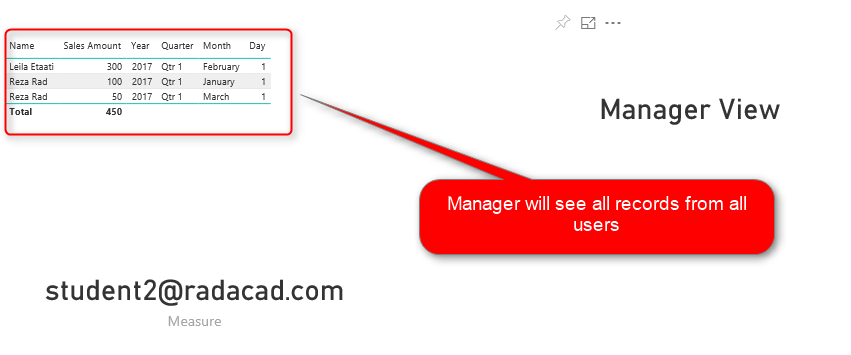
I have written while ago, about how to implement a dynamic row level security in Power BI. This post is an addition to that post. I’ve had a lot of inquiries that; “What If I want users to see their own data, and the Manager to see everything?”, or “How to add Manager or Director Level access to the dynamic row level security?” This post will answer this question. In this post, you will learn a scenario that you can implement a dynamic row level security. In this scenario, everyone will see their own data, but the manager will see everything. If you want to learn more about Power BI, read Power BI book from Rookie to Rock Star.
Video
Row Level Security Intro Guide
In Power BI, you can implement a row level security in a way that user has restricted access to the content in the report. This is called Row Level Security. There are different ways of implementing row level security in Power BI. Let’s see different types of it;
Static Row Level Security
The logic of security is static in the role definition, we call it Static Row Level Security. to learn more about it, read this blog post.
Row Level Security in SSAS Live Connection
In this case, the Power BI Report connected live to an SSAS model. the username will pass through effective username connection information, to learn more about it, read this post.
Dynamic Row Level Security
When you have too many roles, then implementing static roles is not an option. You need to create one role and maintain the logic of security within the data model. This is called Dynamic row level security. To learn more about this, read this blog post.
Addition to Dynamic RLS
The dynamic RLS example that I explained in this post, does not include the manager level access. Sometimes you need the manager to have access to all data. This current post explains how to do it;
Sample Dataset
To create a scenario with manager level access, and employee level access, I created two tables as below;
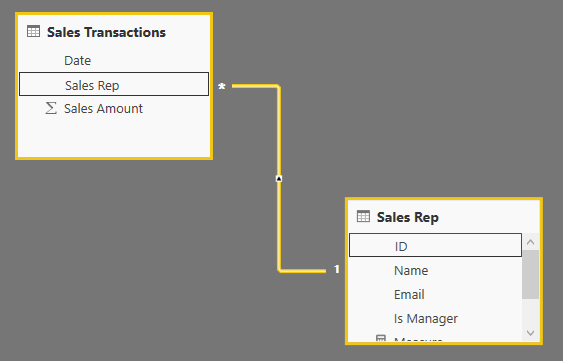
Sales Rep Table. This table has a field which is “Is Manager”, values are zero or one. If the value is one, then the sales rep is a manager and can see everything if the value is zero, then sales rep should be able to see his/her only data rows.

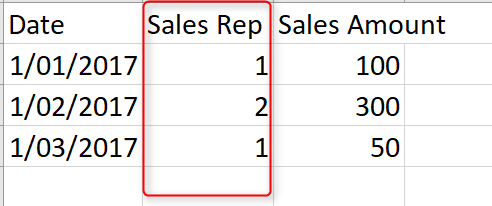
We also have a sales transactions table, which includes all transactions. there is a field in this table which is the link to Sales Rep.
Relationship of these two tables are based on Sales Rep and ID field obviously
Creating the Role
As you can see in the data table we can easily identify which sales transactions belongs to which sales rep. So a role logic to get only rows for every sales rep can be easily implemented with a DAX filter like this:
'Sales Rep'[Email]=Username()
I have explained that method previously in details here. However, that method does not work when I have a “manager” level access too. For a manager level access, we can make some modifications. There are multiple ways of implementing it. This is one way of doing that;
The First Step; Identify the User
The very first step is always identifying who is the person logged into the report in Power BI Service. This can be done with Username() or UserPrincipalName() functions in DAX.
The Secon Step; Is the Logged In User, Manager or Not?
We can use a DAX expression to identify is the person logged in, a manager or not. This can be done with a simple MAXX expression as below;
MaxX(
Filter(
'Sales Rep',
'Sales Rep'[Email]=Username()
)
,'Sales Rep'[Is Manager]
)
In the expression above, we are using FILTER() to identify all rows from the sales rep table, where the email address matches the logged in user. Then we get the maximum [Is Manager] value from that using MAXX() function. if the result of the expression above is 1, then the person is a manager, otherwise not.
If the User is not Manager, show only records related to the user
If the user is not a manager, then we just show the data related to him/her. this can be an expression as below;
'Sales Rep'[Email]=Username()
If the user is a manager, then show everything
an easy way of showing everything is writing a DAX expression that always returns true as a result. as simple as this;
1=1
All in One
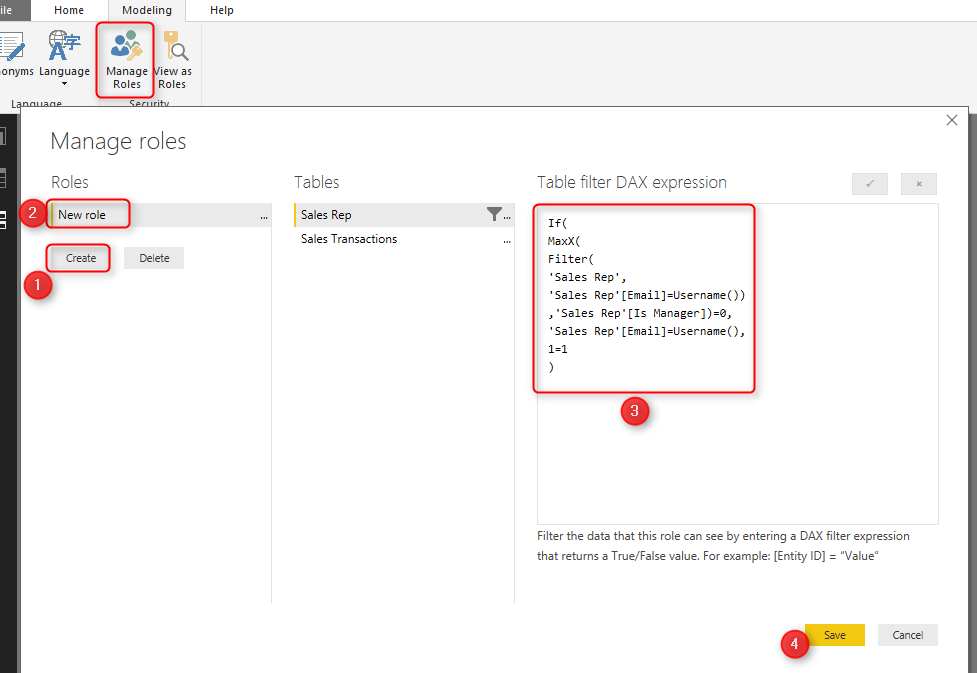
Now if we combine all these codes and logic together, we end up with an expression as below;
If(
MaxX(
Filter(
'Sales Rep',
'Sales Rep'[Email]=Username())
,'Sales Rep'[Is Manager])=0,
'Sales Rep'[Email]=Username(),
1=1
)
The expression above will show everything to the manager, and will only show related data to non-manager users.
You can create a role in Power BI under Sales Rep table with the expression above;
Test the Result
After creating this role, publish the report into Power BI, Go to Security configuration of the dataset;
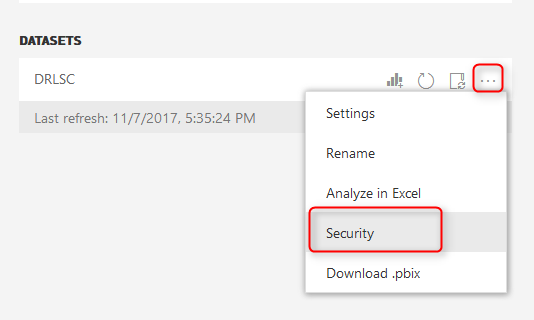
Add all users to the role. There will be no harm for this. If the user is not in your Sales Rep list, they will not see anything. If they are, they will have restricted access.

Then share the dashboard also to all users.
This is what Reza (Restricted user which is not manager) will see;
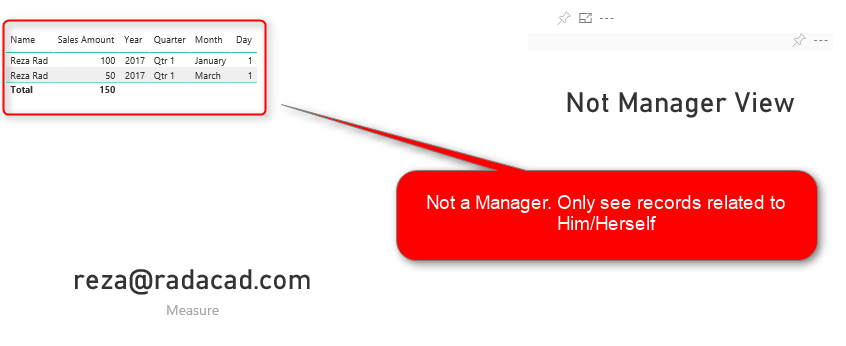
And this is what Mark (Manager user) will see;
Summary
In summary, this was an add-in to the row level security post. In this post, you’ve learned how you can implement a dynamic row-level security with a manager level access. This method implemented very simply, there are other ways of implementing it as well. In the future, I’ll write about other scenarios of RLS with multiple user profiles as well. If your Row Level Security requirement is different, please let me know in the comments, I would love to know about it, and can help you to implement it.


Reza is author of more than 14 books on Microsoft Business Intelligence, most of these books are published under Power BI category. Among these are books such as Power BI DAX Simplified, Pro Power BI Architecture, Power BI from Rookie to Rock Star, Power Query books series, Row-Level Security in Power BI and etc.
He is an International Speaker in Microsoft Ignite, Microsoft Business Applications Summit, Data Insight Summit, PASS Summit, SQL Saturday and SQL user groups. And He is a Microsoft Certified Trainer.
Reza’s passion is to help you find the best data solution, he is Data enthusiast.
His articles on different aspects of technologies, especially on MS BI, can be found on his blog: https://radacad.com/blog.
Hi
I applied RLS in my report successfully but I’d like to add “Default Value” for each RLS.
for example: – Manager1 can see data for Country A, B —> Default country selected in slicer is A
– Manager2 can see data for B, D —- > Default country selected in slicer is B
I appreciate to help me if there is a way to do it in power BI.
Thanks
Hi.
At the moment, you cannot set the default selection of slicer based on RLS. However, you can combine your visuals with DAX to achieve that as a workaround.
Cheers
Reza
Hi,
I’ve successfully been able to apply this process for one level of our org (regional manager), however, I’m struggling to figure out how to do this for our territories. In my situation I’m trying to filter accounts down to the territory manager (TM). The problem is that each amount has two territory managers based on the business unit. I can get the regional filter to work as it’s only one person per account. The two reps:one account seems to keep breaking the logic though and I can’t seem to get around it. I can’t build relationship tables as they won’t allow two relationships (2 reps against a table of all reps in a single column). Any assistance would be awesome, thank you!
Hi Pepper
you need to read my article about users and profiles with RLS.
Cheers
Reza
Thank ;you so much Reza, i have a question, how do i configure rls for people with multiple managers? i tried PATH and i get “duplicate” errors
thanks
If it is one or two more managers, you can have other fields in your dataset with 2nd manager or 3rd manager id, and duplicate this logic for them.
if it is more than that, you need to combine parent-child scenario with many-to-many relationship, which I explained an example of that here.
Cheers
Reza
Hi Reza ,all your posts are great ,I have different requirement in RLS,i have these many Dim fields in main Table/Fact Table say Region,Business Unit,Business Segment and Business Subsegment and in another table or Excel i have EMAIL ID ,Region,Business Unit,Business Segment and Business Subsegment information ,differnt users have different access levels like one has only Region the other has Region,Business Unit and last one has restriction on all fields .how to achive this in PBI RLS ?
You need to create a hierarchy of region/business unit/business segment. Then you can relate users to it and apply RLS on it. I explained similar thing here.
Cheers
Reza
Hi Reza,
Both my dax in RLS says that the RLS-statements defined in the table are not defined as the type true/false. I have tried both with the same result:
IF(LOOKUPVALUE(
‘Sales rep'[IsManager],’Sales rep'[Mail],USERPRINCIPALNAME()) = 1,1=1,USERPRINCIPALNAME())
and
IF(
MAXX(
FILTER(
‘Sales rep’,
‘Sales rep'[Mail] = USERPRINCIPALNAME()),
‘Sales rep'[IsManager]) = 0,
USERPRINCIPALNAME(),
1=1)
Thanks,
Mikkel
Hi Mikkel
where did you write this expression? if the expression is written in a DAX measure you are most probably getting that error. but if it is written in the RLS script window, should work. If not, I’d say we need to look at the data model
Cheers
Reza
Good article. Any idea about if Salesman can see his report beside regional and companywide. Means he cannot see other salesman figures but can see combined figures.
Hi Syed.
Check out my recent blog article about it here.
Cheers
Reza
I need to send different reports to different people a mentioning their territory.
As if Name 1 logins, a territory is assigned to him in the dataset and he can only see dashboard details according to that.
Hi Shagun
You can do that either with static row level security, or with the dynamic one mentioned here.
if you used the dynamic approach, you should have this data in tables, and their relationships. if you use the static, then in the website is where you assign roles to users.
Cheers
Reza
Really enjoyed your article as its highly informative
Thanks for the article, I have implemented RLS in similar way. But for full access users (who don’t have pro license) still not able to see full data like some filter from RLS is being applied.
if(
LOOKUPVALUE(‘RLS Table'[Full Access],’RLS Table'[ID],USERPRINCIPALNAME())=1,
true(),
‘RLS Table'[ID] = USERPRINCIPALNAME()
)
From total of 161 Codes users only see 147 Codes for whom I have kept Full Access column value as 1.
But pro license users see full 161 codes.
Hi Amit
please share more information about your implementation:
how the report is shared with others? worskapce/app? what is the sharing access that users have. how the table structure and the data of that is?
I can then look into this and see what is the problem.
I need to grant access to a dashboard based on staff level. A user should be able to see their data as well as staff levels below them. For example: A Manager can see Senior level data from group A his direct team and group B Senior level data not is direct team.
Hi Peace
read my article here that I explained about it.
Cheers
Reza